How to Use J-Cuts and L-Cuts for Natural Dialogue Editing
In film editing, dialogue scenes often feel most natural when the audience never notices the cuts. A J cut L cut dialogue editing technique does this by shifting part of the transition into sound or picture before the full change happens on screen. The result is a conversation that feels continuous, attentive, and alive.
These techniques are simple in concept but powerful in practice. They help editors manage attention, preserve rhythm, and avoid the mechanical feeling that appears when picture and sound change at exactly the same moment.
What J-cuts and L-cuts are
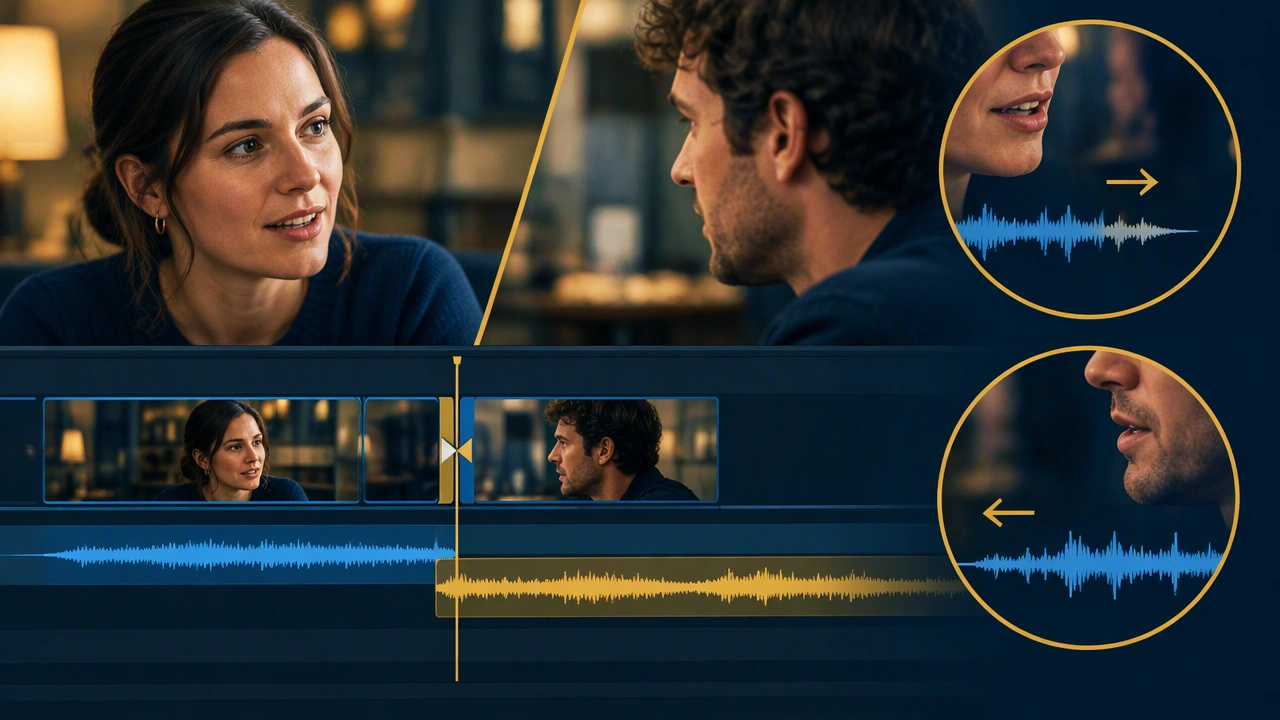
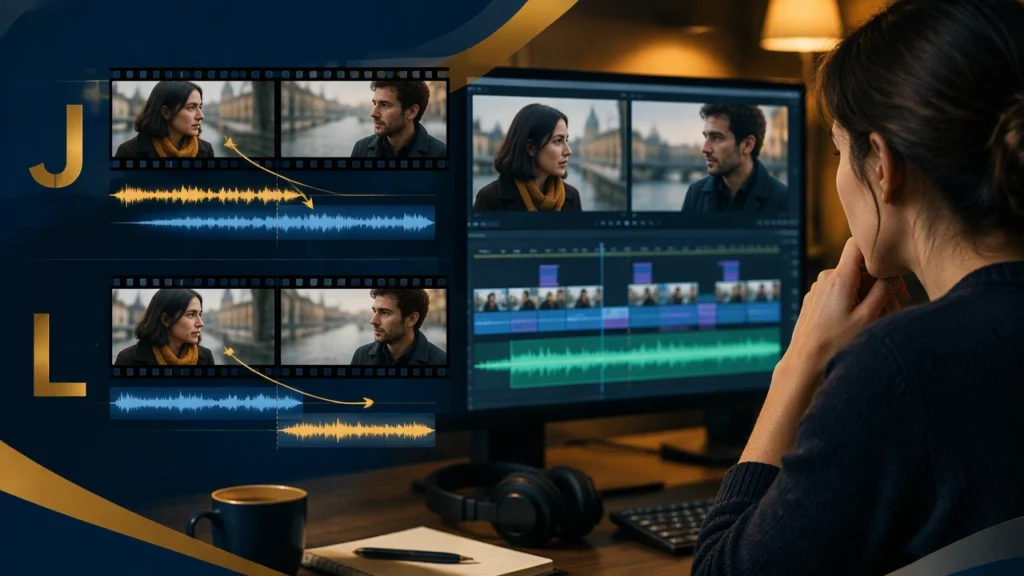
A J-cut brings the audio of the next shot in before its picture appears. The viewer hears a character begin speaking, or hears an important sound from the next setup, while still looking at the current shot. The name comes from the shape the edit makes on a timeline: the audio track extends to the left beneath the incoming video, resembling the lower hook of the letter J.
An L-cut does the reverse. The picture changes while the audio from the current shot continues underneath. The viewer sees the next image but still hears the previous speaker finish a sentence, react, or breathe. On a timeline, the outgoing audio extends to the right beneath the new video, forming an L shape.
Both techniques separate the moment of the visual cut from the moment of the audio cut. That small offset is often enough to make an edit feel invisible.
Why dialogue needs overlapping transitions
Real conversations rarely move in perfectly synchronized units. People begin speaking before they have fully turned, listeners react while someone else is finishing, and meaning often arrives through tone as much as words. If every cut changes picture and sound at the same instant, the scene can feel rigid or over-directed.
J-cuts and L-cuts restore some of that natural overlap. They let the audience anticipate a speaker, remain with a reaction, or carry the emotional weight of a line into the next image. The technique also supports continuity when coverage comes from different angles, shot sizes, or moments in the take.
How a J-cut makes dialogue flow
Use a J-cut when the incoming line should pull the scene forward. For example, the camera may remain on a listener while the next character begins speaking off-screen. The listener’s expression has time to register before the edit reveals the source of the voice.
This approach is especially useful when:
- The next line changes the direction of the conversation.
- The current reaction is more valuable than an immediate cut to the speaker.
- The incoming dialogue needs to feel spontaneous rather than announced by a visual change.
- The scene benefits from a slight sense of anticipation.
In practice, place the incoming audio a few frames before the cut, then adjust the overlap to match the rhythm of the performance. Too little offset may feel like a standard hard cut; too much may make the dialogue sound disconnected from the image.
How an L-cut preserves thought and reaction
Use an L-cut when the audience should stay with the consequence of a line. After a character delivers difficult news, for instance, the picture can move to the listener while the speaker’s final words continue underneath. The new image becomes a reaction shot without interrupting the sentence.
L-cuts are also helpful when a character trails off, pauses, or adds an afterthought. Cutting away too early can flatten the performance. Letting the audio continue gives the moment space and keeps the speaker’s intention present even when they are no longer visible.
Choosing between them
The choice depends on which element should lead the transition. If sound should invite the viewer forward, choose a J-cut. If the new image should arrive while the old sound still carries meaning, choose an L-cut.
Ask three questions during the edit:
- Where is the audience’s attention most useful right now?
- Which element contains the emotional information: the voice, the face, or the silence?
- What will make the next cut feel motivated rather than merely scheduled?
If the answer is the incoming voice, try a J-cut. If it is the outgoing performance or reaction, try an L-cut.
A practical editing workflow
Build the conversation first
Begin with a clean dialogue assembly. Establish the basic order of lines and make sure the scene’s meaning is clear before experimenting with overlaps. The editorial goal at this stage is comprehension, not polish.
Find the emotional handoff
Listen for moments where one line creates a response. Those handoffs are strong candidates for J-cuts and L-cuts because the audience already expects a change. The edit can follow the psychological movement of the scene instead of imposing an arbitrary rhythm.
Offset picture and sound deliberately
Move the incoming audio slightly before the visual cut for a J-cut, or extend the outgoing audio after the visual cut for an L-cut. Start with a subtle offset and refine it by watching the scene at normal speed. The transition should feel smooth, not noticeably delayed.
Protect clarity
Overlap should never make the dialogue difficult to understand. Avoid stacking competing lines unless confusion is intentional. Keep room tone consistent across the transition so the audio does not pulse or drop when the picture changes.
Review the scene as a rhythm
Watch the sequence more than once. On the first pass, check comprehension. On the second, notice where the cuts call attention to themselves. On the third, listen with the picture muted to determine whether the dialogue track remains coherent.
Common mistakes to avoid
Editors sometimes use J-cuts and L-cuts as decoration rather than structure. If every line overlaps the next, the scene can lose contrast and begin to feel rushed. Reserve the technique for transitions that need momentum, continuity, or emotional carryover.
Another mistake is ignoring eye-line and spatial logic. A voice can arrive early, but the viewer should still understand where it comes from. Similarly, an L-cut should not leave audio attached to a shot after the visual context has made it irrelevant.
Finally, avoid cutting beneath important words. Overlaps are most effective when they preserve complete thoughts. Shift the edit point by a few frames if the current placement interrupts a phrase or buries a key reaction.
Making the edit invisible
The best dialogue edits do not announce their cleverness. They use timing, sound, and attention to make the conversation feel uninterrupted. J-cuts invite the audience into the next moment; L-cuts allow the previous moment to keep resonating. Together, they turn separate shots into a continuous exchange.
Practice the technique on a simple two-person scene. Try each line as a J-cut, then as an L-cut, and compare the results. The right choice will not always be the most obvious one, but it will usually be the cut that follows the thought rather than the footage.